
The Campus Directory pulls information from the Name fields in UCPath, which includes your Lived First, Middle, and Last Name. Lived Name is the name you commonly use and may differ from your legal first, middle, or last name. If you do not commonly use your middle name in communications, you will need to update your lived name in UCPath to remove it from downstream systems.
If you have not added a lived name in UCPath, your Legal Name fields were automatically copied over.
Employees can take the following steps to update their lived name in UCPath:
- Select Personal Information in the menu bar.
- Under the Personal Summary column, select the Name hyperlink.
- Answer the security question.
- Select the Edit Current button (right arrow in the Current box).
- Update the (lived) name fields:
- If you do not commonly use your middle name in communications, you may remove it in the lower ‘Name’ section.
- Select Save.
Contingent Workers (CWRs) and Persons of Interest (POIs), such as Academic Prehires & Retirees, cannot update their names in UCPath Online and will need to contact their Region or UCPath Center for assistance with submitting a Personal Data Change Template.
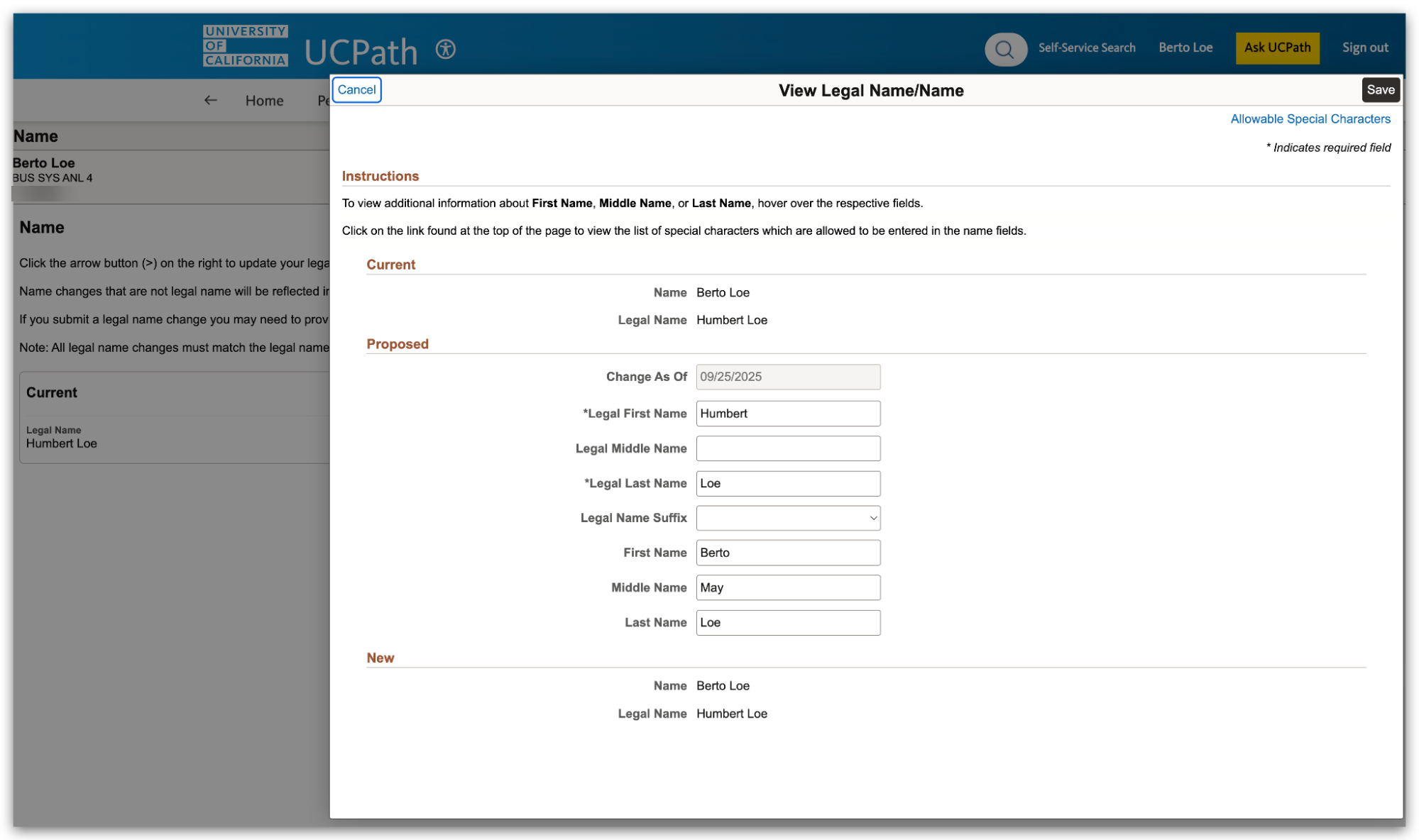
Image Description: View Legal Name/Name popup with Legal Name: Humbert Loe and Lived Name: Berto May Loe. Notice that the name in all other places on these pages will display as the Lived First and Last Name "Berto Loe" -- it will not display Legal Name, nor will it display the Lived Middle Name.